mirror of
https://github.com/Siccity/xNode.git
synced 2026-03-26 22:49:02 +08:00
 5acb7e4ba8
Complete fix to address bluriness of the UI in the Node Editor Window. Previous fixes were not all encompassing and failed to account for now even dimensions of Editor Window.




Downloads / Asset Store / Documentation
xNode
Thinking of developing a node-based plugin? Then this is for you. You can download it as an archive and unpack to a new unity project, or connect it as git submodule.
xNode is super userfriendly, intuitive and will help you reap the benefits of node graphs in no time. With a minimal footprint, it is ideal as a base for custom state machines, dialogue systems, decision makers etc.
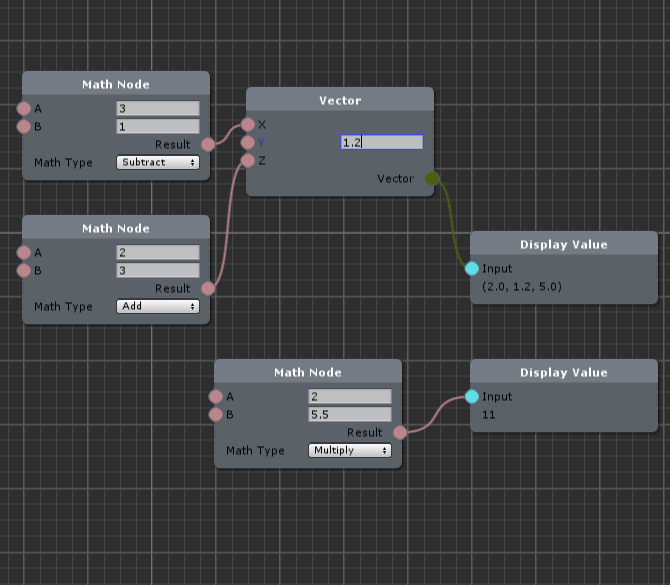
Key features
- Lightweight in runtime
- Very little boilerplate code
- Strong separation of editor and runtime code
- No runtime reflection (unless you need to edit/build node graphs at runtime. In this case, all reflection is cached.)
- Does not rely on any 3rd party plugins
- Custom node inspector code is very similar to regular custom inspector code
- Supported from Unity 5.3 and up
Wiki
- Getting started - create your very first node node and graph
- Examples branch - look at other small projects
Node example:
// public classes deriving from Node are registered as nodes for use within a graph
public class MathNode : Node {
    // Adding [Input] or [Output] is all you need to do to register a field as a valid port on your node
    [Input] public float a;
    [Input] public float b;
    // The value of an output node field is not used for anything, but could be used for caching output results
    [Output] public float result;
    [Output] public float sum;

    // The value of 'mathType' will be displayed on the node in an editable format, similar to the inspector
    public MathType mathType = MathType.Add;
    public enum MathType { Add, Subtract, Multiply, Divide}

    // GetValue should be overridden to return a value for any specified output port
    public override object GetValue(NodePort port) {

        // Get new a and b values from input connections. Fallback to field values if input is not connected
        float a = GetInputValue<float>("a", this.a);
        float b = GetInputValue<float>("b", this.b);

        // After you've gotten your input values, you can perform your calculations and return a value
        if (port.fieldName == "result")
            switch(mathType) {
                case MathType.Add: default: return a + b;
                case MathType.Subtract: return a - b;
                case MathType.Multiply: return a * b;
                case MathType.Divide: return a / b;
            }
        else if (port.fieldName == "sum") return a + b;
        else return 0f;
    }
}
Join the Discord server to leave feedback or get support. Feel free to also leave suggestions/requests in the issues page.
Projects using xNode: